
Restaurant bar automation and profit control across the bar menu
Restaurant bar automation should cover several tasks at once: fast service, accurate accounting, food cost control and a link to CRM.

Implementation and integrations
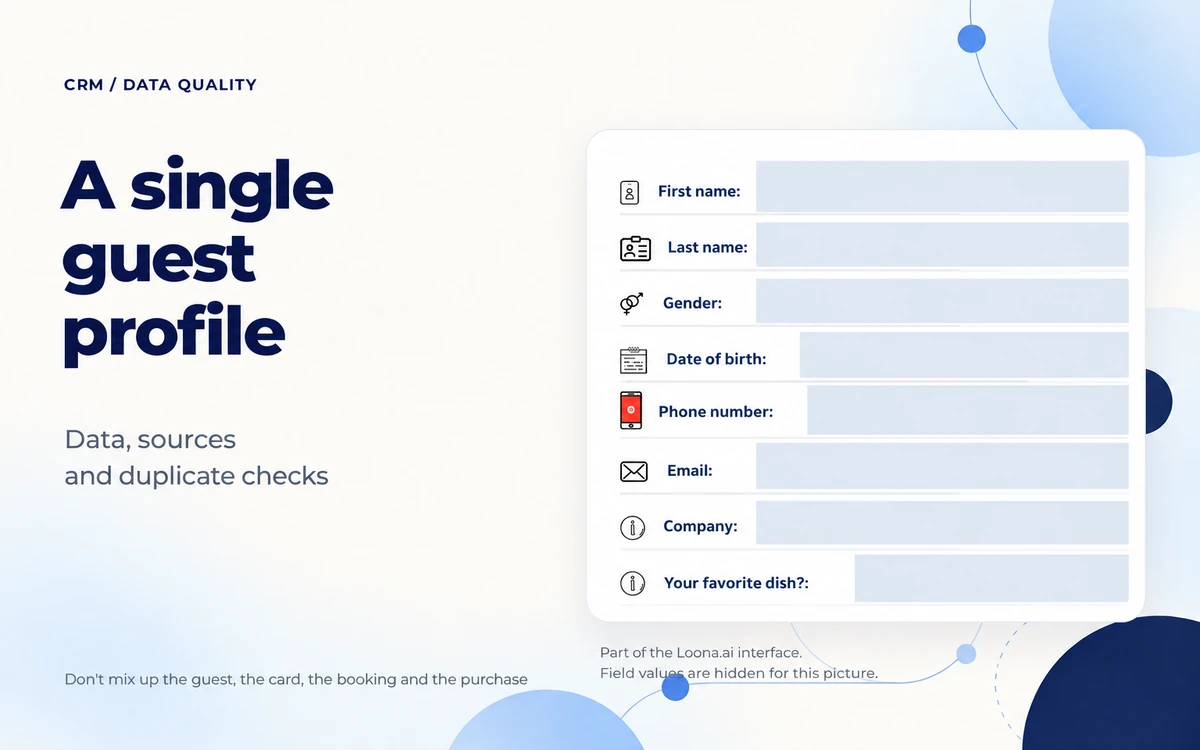
To choose guests for a personalized offer or to get ready for their visit, you need a connected history: who this person is, what they bought and whether you can contact them. Start with the contact, the visits and purchases you have, bookings and consent details. For each source, decide in advance how you will recognize the guest and check unclear matches.
A single profile does not mean the database will clean itself of repeat records. Loona.ai CRM keeps visits, purchases, bookings, preferences and the history of communication in one record. But what data you get depends on the connected sources, and whether your existing database can be moved is assessed separately. It is worth agreeing on the rules for matching and fixing records before you connect.
Collect a field only for a specific action your team will take. If you cannot explain why the restaurant needs the information and who will keep it up to date, put off collecting it.
Below is a suggested set of data for your working database. It is a guide for preparing data. It is not a list of required fields or a promise that your integration already sends each of them to Loona.ai.
| Data | Where it can come from | What to use it for | What to check |
|---|---|---|---|
| Name and current contact | Sign-up form, existing database, booking system | Find the right record and contact the guest | The contact belongs to this guest; the same name does not prove a match |
| Visits and purchases | POS system or back-office system through an agreed integration | Pick guests by purchases and by how long ago they visited | Which transactions are linked to the person; how cancellations and returns are counted |
| Bookings | A connected module or booking source | See the booking history before service | A request, a cancellation and an actual visit are not mixed up |
| Loyalty cards | Loyalty program | Link program membership to the guest | Several cards are not counted as several people |
| Preferences and communication history | Available surveys and connected communications | Take a confirmed guest request into account | Where the information came from and if it is still current |
| Consent details | Sign-up forms and documents from the source system | Check if the chosen communication is allowed | What the consent was given for, where the proof is and if there is an opt-out |
A contact and consent do different jobs. Having a phone number helps you find a record, but on its own it is not a reason to add the guest to a marketing campaign.
Date of birth, gender and detailed survey data are not needed for every task. For example, to choose guests by how long ago they last bought something, you do not need their age. The Loona.ai analytics materials point this out separately: gender and age charts can be incomplete or unreliable if the sign-up form does not collect this data or the fields are optional. Do not treat missing data as reliable facts about your audience.
Make a short data map: the system, the available records, the link to the guest, the person in charge and how it is updated. For each system, answer these questions:
If a check is not linked to a specific guest, do not assign a buyer to it by guessing. Such a sale can stay in your general sales records until you figure out if it can be correctly linked to a profile. Otherwise the personal history will look complete, but it will be based on a mistake.
Do not mix up where a record came from with what brought the guest to you. A loyalty program form explains where the contact came from. The answer "friends recommended it" shows what the guest said. Neither of them on its own proves which ad led to the purchase.
Loona.ai connects to business systems through the available integrations. It also has an API and webhooks. These are ways to exchange data, not a promise that any field can be moved from any database. Before work starts, agree on the set of data, the update rules and how the result will be checked. The CRM does not replace your POS system or back-office system.
First, agree which record counts as the main one and who decides in unclear cases. A phone number written the same way is useful for finding matches, but it does not prove that one person stands behind all the records.
The order below is a recommendation for how to work with the database. It does not describe a confirmed feature for automatically merging records in Loona.ai.
In the source databases, one number can be written with spaces, brackets or without the country code. Agree on one format for comparing. Keep the original value and where the record came from, so a mistake can be traced. Do not fill in missing digits by guessing.
Ask the implementation team where this preparation will be done: in the source system, in a file before the move or in another agreed way. Having a CRM does not mean that this cleanup is already set up.
A first name, last name or favorite dish is not enough on its own as a reason to merge. One phone number can also be used for family or work bookings. If the data does not agree, leave the records for review and do not join the histories automatically.
A made-up example: one database has a loyalty program member record, and another has a booking under the same number but a different name. This is a reason to check the link. Maybe the guest booked for someone else. Do not move purchases and preferences from one record to another without checking.
Even if only one record is left in the list, transactions can repeat inside it. Compare the original purchase with the entry in the CRM: was it loaded again during the next data transfer? Check cancellations, returns and booking changes separately.
Before any merging or deleting, agree on what will happen to the history, loyalty cards and consent details. If a safe way to fix it is not confirmed, do not experiment on the live database. Pass the unclear case to the person in charge of data and to the implementation team.
The Loona.ai CRM presentation describes filters by consent to receive marketing messages and custom consents at sign-up. These tools help you pick an audience, but they do not replace checking the basis of the consent, what it covers and if it is still valid.
To prepare the database, we suggest tracking separately the purpose and channel of communication, the source that confirms the consent and opt-out details. Agree with the person in charge of personal data on which details to keep and how to store them. This is a process recommendation. It does not say that all these fields exist in the Loona.ai interface, and it is not legal advice.
If, during the move, you only got a column that says "agreed", find out what exactly the person agreed to and where this is confirmed. Until this is sorted out, do not add such records to a marketing audience. If the data does not agree, do not choose the option that allows contact just because it makes the campaign bigger.
For a chain, one database should not mean the same access for everyone. Loona.ai has a shared guest database across venues and brands, plus settings for staff permissions. During implementation, decide who needs contacts, who needs service history and who is allowed to fix data. A shared database on its own does not answer whether you can use one brand's data for another brand's communications: this has to be assessed separately.
Start with one clear use case. This makes it easier to see what data is missing and where the link between sources does not work right.
Getting ready for a visit. Look at the available history of bookings and communication, and at confirmed preferences. Check that a wish is still current if service depends on it. Do not draw a lasting conclusion about a guest from a one-time order or someone else's booking.
Choosing an audience for an offer. In Loona.ai CRM you can group guests by visits and purchases, for example, pick out those who started coming less often. Before you use such a segment, make sure the right sources are connected and the history does not stop at the moment of the move. If an incomplete database shows no new purchases, it does not yet mean the person stopped coming.
Working with several venues. A shared database lets you see history across the chain, and staff permissions let you limit access. Decide in advance whose data you need for the task: one specific restaurant or several locations. The Loona.ai analytics guide has an important note about the tab it describes: the location filter does not filter the audience. Do not assume that one filter works the same way in all reports and selections.
In any use case, tell apart the guest, the card, the booking and the purchase. In Loona.ai analytics, the installed cards metric adds up over time and includes cards that were later deleted or deactivated. Without extra checks, you cannot treat it as the number of active guests or of people who can receive a message.
Ask the team to show not only the total number of records, but also the path of specific test data from the source to the profile. For the check, use agreed test records and do not export personal data into open documents.
Write down the errors you find and the person in charge of each one. To launch your chosen use case, a clear link between contact, history and consent matters more than a long list of filled fields. After the check, agree on who reviews new matches and fixes data when the sources change.
Restaurant bar automation should cover several tasks at once: fast service, accurate accounting, food cost control and a link to CRM.

Automating a coffee shop is different from automating a classic restaurant. In a coffee shop, speed matters most
Restaurant management software is not just a set of features. It is the way you run the business. Your venue's format sets the priorities, but the basic rules are the same for all