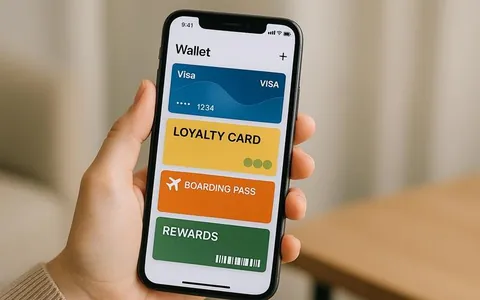
A Wallet card is a digital card that a customer adds to Apple Wallet or Google Wallet and uses as a points card or a discount card. It carries the loyalty program data: the member ID, a barcode or QR code to scan at checkout, current points, tier, expiry date, redemption rules, contacts and useful links.
The main feature of a Wallet card is that it's easy to start using. The customer doesn't need to install a separate app, sign up in an app store or get used to a new interface. The card is added from a link or QR code and is ready to use right away.
What a Wallet card is made of
A Wallet card has a visual part and the data you show the customer. It usually includes: a code for identification (barcode or QR), main fields (points balance, discount, status, expiry date), extra fields (terms, limits, contacts, addresses, links), and design elements (logo, background, brand colors, sometimes a banner).
Choose the fields to match your program mechanics. For a points program, the balance and redemption rules come first. For a tier program, the status and progress. For gift cards, the face value and expiry date.
How a Wallet card works for the customer
For the customer, the process is simple:
the customer gets a link or QR code to add the card (at checkout, on the website, in a campaign, on social media)
opens the link and taps “Add to wallet”
the card appears in the wallet and is available at any time
when paying, the customer opens the card and shows the code to a staff member or a scanner
After that, the card should update based on what the customer does. After a purchase, the points balance, status and coupon availability change. If updates are set up correctly, there's no need to add the card again.
How data updates work
For a business, a Wallet card is valuable because you can update it without issuing a new one. This means that after an event in the CRM (a purchase, points earned, points redeemed, a coupon issued), you change the values on the card: points balance, discount size, tier, expiry date, terms of a specific promotion.
To the customer, this looks just as they expect: the card stays the same, but the data is up to date. This means fewer questions to support and fewer cases where a customer stops using the loyalty program because the numbers don't match.
Wallet card or app: which to choose and when
A Wallet card is a good fit if your goal is to launch loyalty fast and make it easy to use at checkout. An app makes more sense when you need more features: a catalog, booking, order history, a complex customer portal, delivery use cases.
In practice, these formats are often used together: the Wallet card covers the basic part of loyalty for most customers, and the app stays an extra channel for those who want a deeper connection.
What a business should plan before launch
Customer identification. Decide in advance how the POS system will recognize the customer: by QR code/barcode, phone number or another ID. For physical locations, a code on the card is more convenient because it's faster to process. The CRM should also have a "customer - card" link and a history of transactions.
Card distribution channels. The closer adding the card is to the moment of decision, the higher the conversion. Places that work: the checkout counter, the check, the "Thank you for your order" page, SMS or a messaging app after sign-up, email, the customer profile page on the website.
Update logic. If the card doesn't update after a purchase, trust in the program drops. So describe in advance which events change the fields, and what delay is OK for you: right away, once an hour, once a day. For coupons and limited-time promotions, a delay is often a serious problem.
Communications and consent. If you use contact details and send messages, collect consent correctly and explain clearly what notifications will come and how to unsubscribe. It's handy to put a link to the privacy policy and a support contact right on the card.
Typical use cases where a Wallet card works best
A Wallet card works best in programs where simplicity and speed matter to the customer: a points program (earning and redeeming), a tier discount, personal coupons, a deposit or prepayment, gift cards. In every case, the rule is the same: the front of the card should show 2-3 key values and the code to show at checkout.
How to measure how well a Wallet card works
You measure it by the add-to-wallet funnel and by real use. People usually look at: how many customers added the card, what share activated it (made a purchase with the card), how often the card is shown at checkout, how repeat visits and average check change for cardholders, how customers respond to personalized offers, how LTV changes in segments where the card is used regularly. When the card is linked to a CRM, these metrics are easy to analyze by location, period and distribution channel.
Mistakes that keep the card from bringing results
Often the problem is not the format but the launch details. Typical causes: too many fields (the customer can't see what matters), a code that's awkward or hard to scan, no updates or a long delay, a "hidden" link to add the card, unclear rules for earning and redeeming points, which lead to more questions and refunds.
Checklist before you publish
The code (barcode or QR) scans reliably at your checkout and on your equipment
The main fields (balance, status, discount) are visible without scrolling
A contact and a link to the rules/policy are shown
Updates after a purchase and after a refund are tested
The page where customers get the card opens fast on phones
Staff know where to find the code and how to add and redeem points
FAQ
Wallet card: what is it? Is it an app?
No. A Wallet card is a digital card in your phone's wallet. You don't need to install a separate app. It's mostly used to show the code and see the main loyalty data.
Can you use a Wallet card without the internet?
Usually yes, to show the barcode or QR code. Updating the balance and terms may need a connection, but showing the code most often works offline.
How does a customer add the card?
With a link or QR code. The business places them at checkout, on the check, on the website, in a campaign or after sign-up.
Why didn't the balance update right after a purchase?
Common causes: a delay in the update schedule, the purchase event wasn't sent to the CRM, or an error in the POS integration. It's best to check this with test transactions before launch.
Can you make personalized offers in a Wallet card?
Yes. The card can show a personal coupon, its expiry date and terms. What matters is that the CRM can segment the customer base and update the card fields when events happen.